
Smart Speakers, Displays, and Hubs: Which Type of Smart Home Device Does What

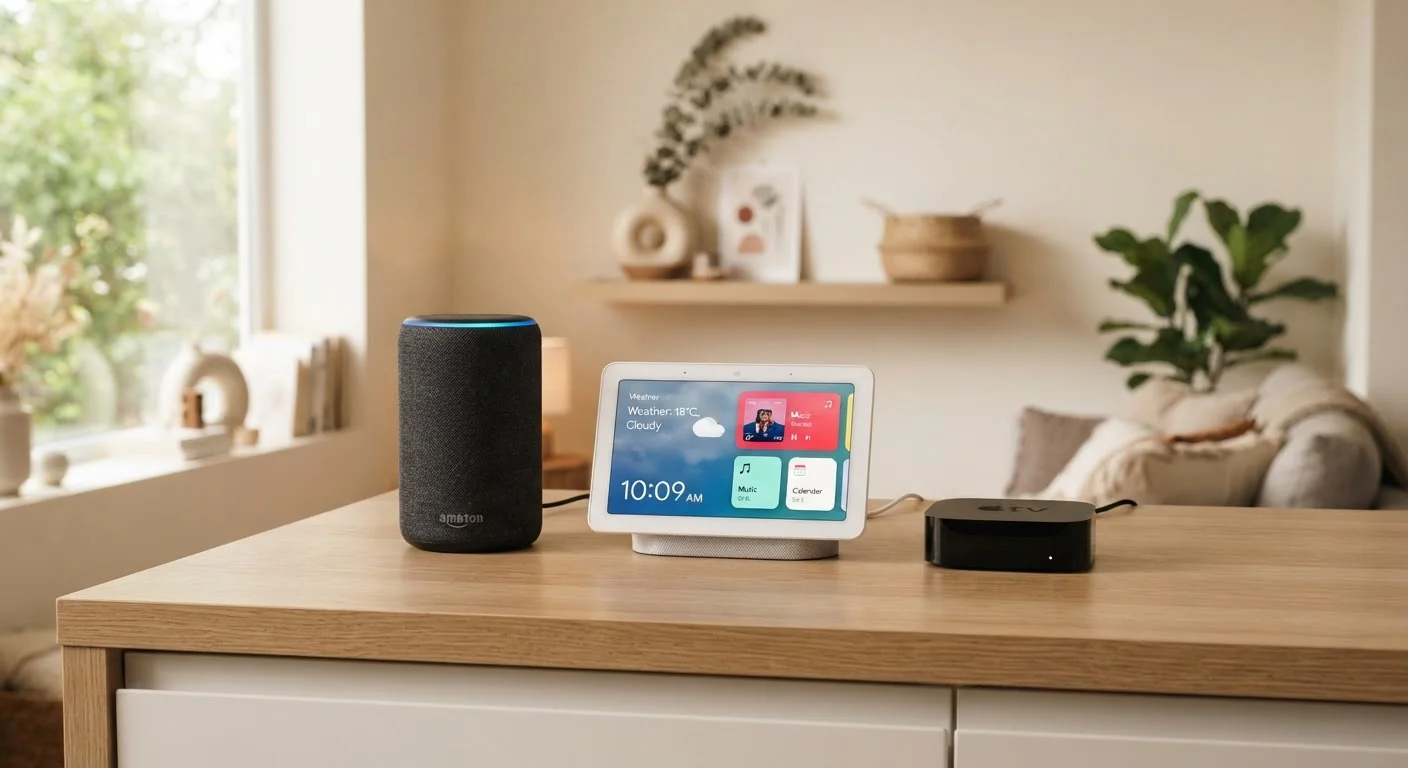
Photo: ConfiReads.com | Blogs For Inquisitive Minds editorial
Key Takeaways
- Smart speakers are voice-first devices designed for audio responses, music, and simple commands.
- Smart displays add a screen to the smart speaker experience, enabling video calls, visual routines, and media playback.
- Smart hubs are the network backbone - they connect and coordinate devices rather than interact directly with users.
- Many devices blur category lines, so knowing your primary need is the best starting point.
- You don't need all three types - most households benefit from just one or two, depending on their setup.
Why These Three Devices Get Confused
Walk into any electronics retailer and you'll find shelves packed with smart speakers, smart displays, and smart hubs - often sitting next to each other, often with similar price tags, and sometimes from the same brand. It's easy to assume they're basically the same thing with different screens. They aren't.
Each device type was designed to solve a specific problem. Confusing them leads to buying gear that duplicates what you already have - or missing a piece that would genuinely improve how your home works. Our Tech Tips & How-Tos hub covers a lot of these practical distinctions; this article zeroes in on smart home command centers specifically.
The clearest way to separate them is by asking one question: What is this device's primary job? For smart speakers, it's listening and talking. For smart displays, it's listening, talking, and showing. For smart hubs, it's connecting and translating signals behind the scenes.
Smart Speakers: Voice First, Everything Else Second
A smart speaker is, at its core, a microphone and a speaker with a voice assistant built in. Products like the Amazon Echo, Google Nest Audio, and Apple HomePod are the most recognized examples in the US market. You speak a command, the device processes it through a cloud-based assistant (Alexa, Google Assistant, or Siri), and you get a spoken response.
Smart speakers excel at:
- Playing music, podcasts, and radio stations
- Answering general questions by voice
- Setting timers, reminders, and alarms
- Controlling compatible smart home devices by voice command
- Making hands-free calls through a linked phone or contact list
What they don't do is give you visual feedback. If you ask about the weather, you hear it - you don't see a forecast graphic. That limitation matters in some contexts (like cooking) and not at all in others (like a bedroom nightstand). For a deeper look at what these devices actually pick up and how they handle your voice data, see our article on what smart speakers can and can't do.
Match the Device to the Room
Smart Displays: When a Screen Changes Everything
A smart display is essentially a smart speaker with a touchscreen attached. The Amazon Echo Show series, Google Nest Hub, and Facebook Portal (now discontinued but still in use) are the best-known examples. They respond to the same voice commands as their speaker-only siblings - but they can also show you information visually and accept touch input.
The screen unlocks a different category of uses:
- Video calling with family and contacts
- Step-by-step recipe guides you can follow while cooking
- Displaying security camera feeds without opening an app
- Showing calendar schedules, weather maps, and news headlines at a glance
- Streaming video content from services like Netflix or Prime Video
Smart displays tend to work best in high-traffic rooms - kitchens, living rooms, or home offices - where a visual dashboard adds genuine value throughout the day. They're typically larger and pricier than smart speakers, so it's worth being honest about whether you'll actually look at the screen or just talk to it.
| Smart Speaker | Smart Display | Smart Hub | |
|---|---|---|---|
| Primary function | Voice interaction & audio | Voice + visual interaction | Device coordination & integration |
| Has a screen | No | Yes | Rarely |
| Responds to voice | Yes | Yes | No |
| Controls other devices | Yes, via voice | Yes, via voice & touch | Yes, via automation rules |
| Supports Zigbee/Z-Wave | Usually no | Some models | Core feature |
| Best room placement | Bedroom, living room | Kitchen, office, living room | Utility closet, anywhere discreet |
| Typical US price range | $30-$100 | $80-$250 | $50-$150 |
Smart Hubs: The Connective Tissue Most People Overlook
A smart hub is fundamentally different from the other two types. It doesn't respond to your voice, it usually doesn't have speakers, and it often doesn't have a screen. What it does is connect devices that otherwise couldn't talk to each other.
Many smart home gadgets - locks, sensors, thermostats, light switches - use wireless protocols like Zigbee, Z-Wave, or the newer Matter/Thread standard rather than standard Wi-Fi. A smart hub translates between these protocols and your home network, acting as a central coordinator. Products like the Samsung SmartThings Hub or Amazon Echo (4th gen, which has a built-in Zigbee hub) fill this role.
You need a hub when:
- You own smart devices from multiple brands that don't natively integrate
- You want local automation that works even when your internet is down
- You're using older or specialized smart home protocols (Zigbee, Z-Wave)
- You want to build complex automation routines triggered by multiple conditions
If you only own one or two Wi-Fi-based smart devices from the same ecosystem, you probably don't need a standalone hub. But as your setup grows, a hub dramatically reduces frustration. This is one of the areas where the smart home category has changed significantly over the past decade, with hub capabilities increasingly folded into other devices.
35%
US households with a smart speaker
According to Edison Research's Infinite Dial report, roughly one in three US households owned a smart speaker as of recent years.
3+
Avg. smart devices per US smart home owner
Consumer surveys consistently find that owners of smart home devices quickly accumulate multiple connected gadgets, increasing the case for a hub.
Choosing What You Actually Need
The honest answer for most households is: start with one smart speaker or display, and only add a hub if your device collection demands it. Buying all three types upfront often means paying for overlap and complexity you won't use.
Ask yourself these questions before purchasing:
- Do I primarily want voice control and audio? → Smart speaker is enough.
- Do I want video calls, recipe guidance, or visual dashboards? → Step up to a smart display.
- Do I have more than a handful of smart devices, some from different brands? → A hub will save you headaches.
- Am I building from scratch? → Consider starting with a platform (Amazon, Google, Apple HomeKit) and adding devices within that ecosystem before introducing a separate hub.
For a balanced view of where smart home technology genuinely delivers and where it falls short, our article on the real benefits and frustrations of smart home devices is a useful next read. And if you're still working out the broader category of devices that belong in your home, the comparison between tablets and laptops applies the same decision-making framework to another common dilemma.
Ecosystem Lock-In Is Real
The content on this site is for informational purposes only and is not a substitute for professional advice. Always consult a qualified professional for guidance specific to your situation.